# Cartographier avec Mapcomplete

## <span style="font-family: 'Arial'; font-size: 16.5pt; color: #000000; mso-style-textfill-fill-color: #000000;">**Mise en place**</span>

<span style="font-family: 'Arial'; font-size: 11pt; color: #000000; mso-style-textfill-fill-color: #000000;">Maintenant que ces quelques points sont éclaircis, nous allons </span><span style="font-family: 'Arial'; font-size: 11pt; color: #000000; mso-style-textfill-fill-color: #000000;">**voir comment on fait**</span><span style="font-family: 'Arial'; font-size: 11pt; color: #000000; mso-style-textfill-fill-color: #000000;">.</span>

<span style="font-family: 'Arial'; font-size: 11pt; color: #000000; mso-style-textfill-fill-color: #000000;">Dans la g</span><span style="font-family: 'Arial'; font-size: 11pt; color: #000000; mso-style-textfill-fill-color: #000000;">**rande diversité des éditeurs OSM**</span><span style="font-family: 'Arial'; font-size: 11pt; color: #000000; mso-style-textfill-fill-color: #000000;"> qui existent </span><span style="font-family: 'Arial'; font-size: 11pt; color: #000000; mso-style-textfill-fill-color: #000000;">*(on fait pas un tuto cartographie OSM ici)*</span><span style="font-family: 'Arial'; font-size: 11pt; color: #000000; mso-style-textfill-fill-color: #000000;">, il en existe un bien particulier nommé </span>[<span style="font-family: 'Arial'; font-size: 11pt; color: #0563c1; mso-style-textfill-fill-color: #0563c1;"><u>mapcomplete.org</u></span>](https://mapcomplete.org/ "https://mapcomplete.org")<span style="font-family: 'Arial'; font-size: 11pt; color: #000000; mso-style-textfill-fill-color: #000000;"> qui est un </span><span style="font-family: 'Arial'; font-size: 11pt; color: #000000; mso-style-textfill-fill-color: #000000;">**éditeur spécialisable**</span><span style="font-family: 'Arial'; font-size: 11pt; color: #000000; mso-style-textfill-fill-color: #000000;">. Notamment il en existe </span><span style="font-family: 'Arial'; font-size: 11pt; color: #000000; mso-style-textfill-fill-color: #000000;">**une version dédiée à la publication des caméras de sécurité** </span>[<span style="font-family: 'Arial'; font-size: 11pt; color: #0563c1; mso-style-textfill-fill-color: #0563c1;"><u>mapcomplete.org/surveillance</u></span>](https://mapcomplete.org/surveillance?z=11.7&lat=45.447316652576745&lon=4.398405624658153 "https://mapcomplete.org/surveillance?z=11.7&lat=45.447316652576745&lon=4.398405624658153")<span style="font-family: 'Arial'; font-size: 11pt; color: #000000; mso-style-textfill-fill-color: #000000;">. Cet éditeur fonctionne sur un navigateur (qu’il soit sur un ordinateur ou un mobile), ce qui vous évitera l’installation d’une application </span><span style="font-family: 'Arial'; font-size: 11pt; color: #000000; mso-style-textfill-fill-color: #000000;">*(ne nous remerciez pas)*</span><span style="font-family: 'Arial'; font-size: 11pt; color: #000000; mso-style-textfill-fill-color: #000000;">. Nous recommendons de l'utiliser sur le terrain depuis un smartphone, mais vous pouvez tout aussi bien prendre des notes sur le terrain et venir faire votre travail de cartographie dans un second temps depuis un ordinateur.</span>

<span style="font-family: 'Arial'; font-size: 11pt; color: #000000; mso-style-textfill-fill-color: #000000;">Bien sur, pour l’utiliser il faut un compte OpenStreetMap pour éditer la base de donnée OSM. A St-Etienne nous avons créer un compte pour notre GL.</span>

[![image.png](https://wiki.extinctionrebellion.fr/uploads/images/gallery/2026-02/scaled-1680-/CdBCFInCZi718NHv-image.png)](https://wiki.extinctionrebellion.fr/uploads/images/gallery/2026-02/CdBCFInCZi718NHv-image.png)

## <span style="font-family: 'Arial'; font-size: 16.5pt; color: #000000; mso-style-textfill-fill-color: #000000;">**UTILISATION**</span>

### <span style="font-family: 'Arial'; font-size: 15pt; color: #000000; mso-style-textfill-fill-color: #000000;">Aller sur le site et se connecter</span>

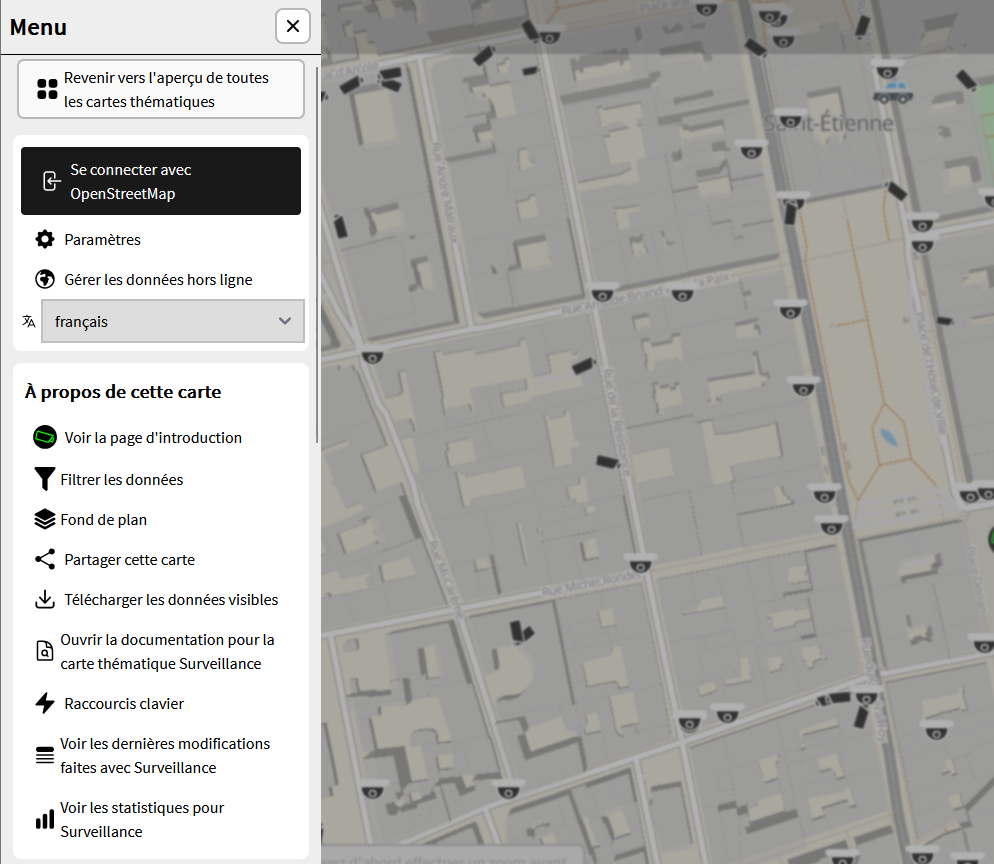
- <span style="font-family: 'Arial'; font-size: 11pt; color: #000000; mso-style-textfill-fill-color: #000000;">**Rendez-vous sur** </span>[<span style="font-family: 'Arial'; font-size: 11pt; color: #0563c1; mso-style-textfill-fill-color: #0563c1;"><u>**mapcomplete.org/surveillance**</u></span>](https://mapcomplete.org/surveillance "https://mapcomplete.org/surveillance?z=11.7&lat=45.447316652576745&lon=4.398405624658153")
- <span style="font-family: 'Arial'; font-size: 11pt; color: #000000; mso-style-textfill-fill-color: #000000;">**Allez dans le « Menu »**</span><span style="font-family: 'Arial'; font-size: 11pt; color: #000000; mso-style-textfill-fill-color: #000000;">, puis dans les </span><span style="font-family: 'Arial'; font-size: 11pt; color: #000000; mso-style-textfill-fill-color: #000000;">**paramètres**</span><span style="font-family: 'Arial'; font-size: 11pt; color: #000000; mso-style-textfill-fill-color: #000000;">, et cliquez sur </span><span style="font-family: 'Arial'; font-size: 11pt; color: #000000; mso-style-textfill-fill-color: #000000;">**« Se connecter avec OpenStreetMap »**</span>
- <span style="font-family: 'Arial'; font-size: 11pt; color: #000000; mso-style-textfill-fill-color: #000000;">Utilisez les </span><span style="font-family: 'Arial'; font-size: 11pt; color: #000000; mso-style-textfill-fill-color: #000000;">**identifiants créés plus haut**</span><span style="font-family: 'Arial'; font-size: 11pt; color: #000000; mso-style-textfill-fill-color: #000000;"> ou votre propre compte</span>
- <span style="font-family: 'Arial'; font-size: 11pt; color: #000000; mso-style-textfill-fill-color: #000000;">**Autorisez le site**</span><span style="font-family: 'Arial'; font-size: 11pt; color: #000000; mso-style-textfill-fill-color: #000000;">, et c’est bon, vous </span><span style="font-family: 'Arial'; font-size: 11pt; color: #000000; mso-style-textfill-fill-color: #000000;">êtes connectéex !</span><span style="font-family: 'Arial'; font-size: 10pt; color: #000000; mso-style-textfill-fill-color: #000000;">  
    </span>

### <span style="font-family: 'Arial'; font-size: 15pt; color: #000000; mso-style-textfill-fill-color: #000000;">Ajouter une caméra</span>

<span style="font-family: 'Arial'; font-size: 11pt; color: #000000; mso-style-textfill-fill-color: #000000;">*Rappelez-vous que* </span><span style="font-family: 'Arial'; font-size: 11pt; color: #000000; mso-style-textfill-fill-color: #000000;">**TOUT CE QUI EST RENTRÉ DANS LA BASE DE DONNÉES DOIT ÊTRE VRAI**</span><span style="font-family: 'Arial'; font-size: 11pt; color: #000000; mso-style-textfill-fill-color: #000000;">*, donc ne mettez pas d'information dont vous n'êtes pas sûre.*</span><span style="font-family: 'Arial'; font-size: 10pt; color: #000000; mso-style-textfill-fill-color: #000000;">  
</span>

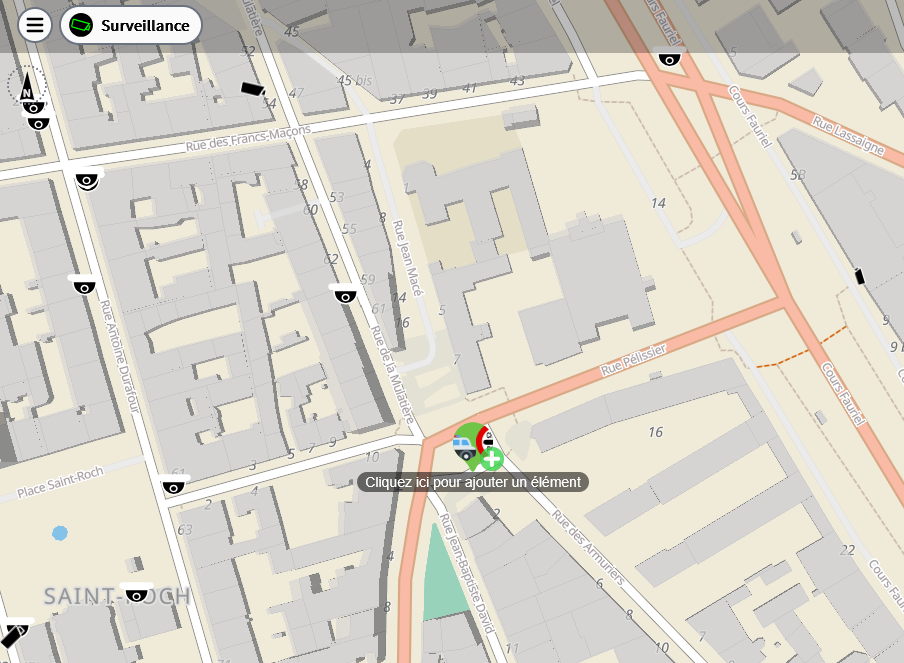
- <span style="font-family: 'Arial'; font-size: 11pt; color: #000000; mso-style-textfill-fill-color: #000000;">Cliquez sur </span><span style="font-family: 'Arial'; font-size: 11pt; color: #000000; mso-style-textfill-fill-color: #000000;">**« Ajouter un nouvel élément » ou sur la carte** pour créer un nouvel objet</span>

[![image.png](https://wiki.extinctionrebellion.fr/uploads/images/gallery/2026-02/scaled-1680-/KhlmErl6yxZKbkol-image.png)](https://wiki.extinctionrebellion.fr/uploads/images/gallery/2026-02/KhlmErl6yxZKbkol-image.png)

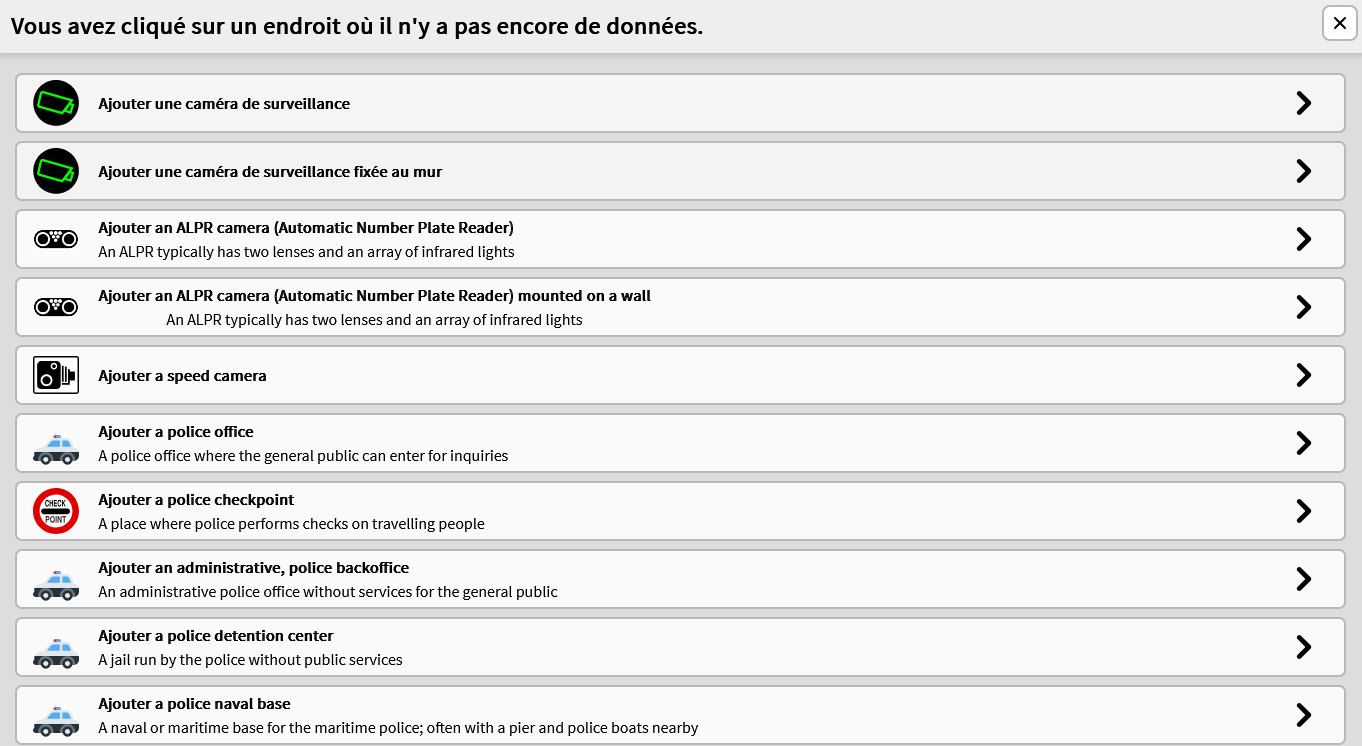
- <span style="font-family: 'Arial'; font-size: 11pt; color: #000000; mso-style-textfill-fill-color: #000000;">L’éditeur va vous demander le type d'objet à ajouter et si la caméra (ou le LAPI) à ajouter est </span><span style="font-family: 'Arial'; font-size: 11pt; color: #000000; mso-style-textfill-fill-color: #000000;">**fixée au mur ou non**</span><span style="font-family: 'Arial'; font-size: 11pt; color: #000000; mso-style-textfill-fill-color: #000000;">. Choisissez la réponse adaptée et validez</span>

[![image.png](https://wiki.extinctionrebellion.fr/uploads/images/gallery/2026-02/scaled-1680-/hhVTA6LOEqtw6liQ-image.png)](https://wiki.extinctionrebellion.fr/uploads/images/gallery/2026-02/hhVTA6LOEqtw6liQ-image.png)

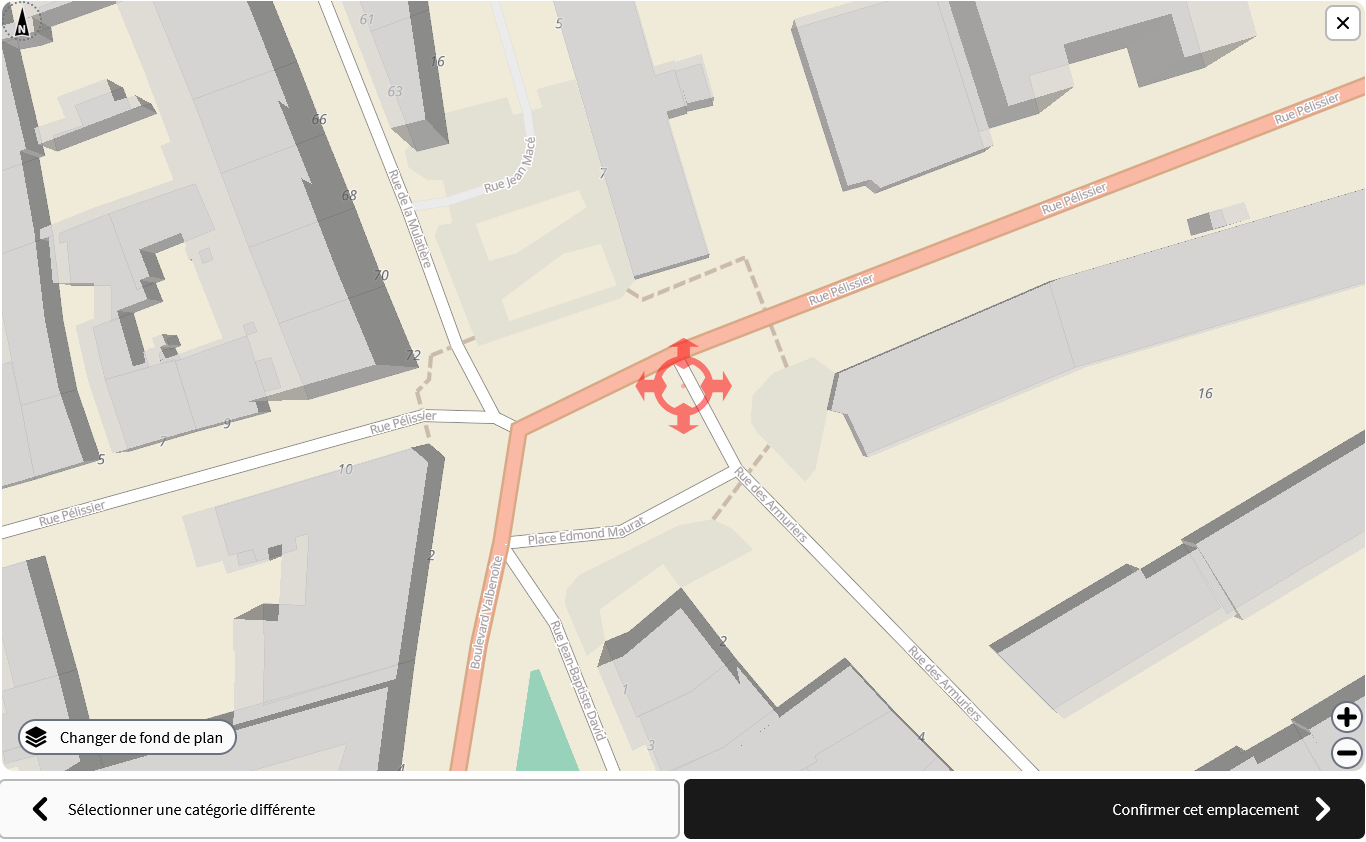
- <span style="font-family: 'Arial'; font-size: 11pt; color: #000000; mso-style-textfill-fill-color: #000000;">Dans la fen</span><span style="font-family: 'Arial'; font-size: 11pt; color: #000000; mso-style-textfill-fill-color: #000000;">être suivante vous allez </span><span style="font-family: 'Arial'; font-size: 11pt; color: #000000; mso-style-textfill-fill-color: #000000;">**placer la caméra avec précision**</span><span style="font-family: 'Arial'; font-size: 11pt; color: #000000; mso-style-textfill-fill-color: #000000;"> (si vous avez choisi « sur un mur » celle-ci « s’accrochera » au b</span><span style="font-family: 'Arial'; font-size: 11pt; color: #000000; mso-style-textfill-fill-color: #000000;">âtiment le plus proche). Soyez le plus précis possible. N'hésitez pas à changer de fond de cartes</span>

[![image.png](https://wiki.extinctionrebellion.fr/uploads/images/gallery/2026-02/scaled-1680-/m7HC8lUhhYpSts3a-image.png)](https://wiki.extinctionrebellion.fr/uploads/images/gallery/2026-02/m7HC8lUhhYpSts3a-image.png)

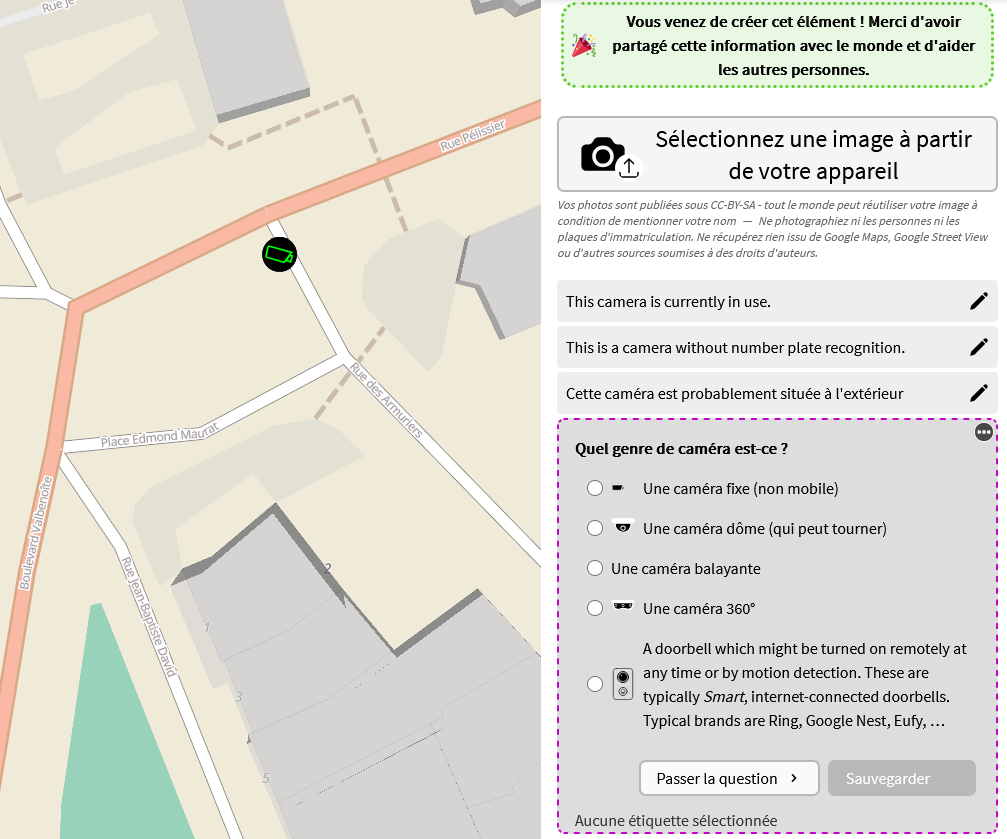
- <span style="font-family: 'Arial'; font-size: 11pt; color: #000000; mso-style-textfill-fill-color: #000000;">Ca y est </span><span style="font-family: 'Arial'; font-size: 11pt; color: #000000; mso-style-textfill-fill-color: #000000;">**vous avez créé l’objet dans OSM**</span><span style="font-family: 'Arial'; font-size: 11pt; color: #000000; mso-style-textfill-fill-color: #000000;">, maintenant on va </span><span style="font-family: 'Arial'; font-size: 11pt; color: #000000; mso-style-textfill-fill-color: #000000;">**ajouter des précisions**</span><span style="font-family: 'Arial'; font-size: 11pt; color: #000000; mso-style-textfill-fill-color: #000000;">.</span><span style="font-family: 'Arial'; font-size: 10pt; color: #000000; mso-style-textfill-fill-color: #000000;">  
    </span>

### <span style="font-family: 'Arial'; font-size: 15pt; color: #000000; mso-style-textfill-fill-color: #000000;">Enrichir un point</span>

- <span style="font-family: 'Arial'; font-size: 11pt; color: #000000; mso-style-textfill-fill-color: #000000;">Premièrement vous pouvez </span><span style="font-family: 'Arial'; font-size: 11pt; color: #000000; mso-style-textfill-fill-color: #000000;">**ajouter une photo**</span><span style="font-family: 'Arial'; font-size: 11pt; color: #000000; mso-style-textfill-fill-color: #000000;">. Ce n’est </span><span style="font-family: 'Arial'; font-size: 11pt; color: #000000; mso-style-textfill-fill-color: #000000;">**pas obligatoire**</span><span style="font-family: 'Arial'; font-size: 11pt; color: #000000; mso-style-textfill-fill-color: #000000;">, mais pourra </span><span style="font-family: 'Arial'; font-size: 11pt; color: #000000; mso-style-textfill-fill-color: #000000;">être </span><span style="font-family: 'Arial'; font-size: 11pt; color: #000000; mso-style-textfill-fill-color: #000000;">**utilisé pour corriger**</span><span style="font-family: 'Arial'; font-size: 11pt; color: #000000; mso-style-textfill-fill-color: #000000;"> vos éventuelles erreurs. Ceci marche particulièrement bien si vous </span><span style="font-family: 'Arial'; font-size: 11pt; color: #000000; mso-style-textfill-fill-color: #000000;">êtes sur mobile</span>
- <span style="font-family: 'Arial'; font-size: 11pt; color: #000000; mso-style-textfill-fill-color: #000000;">Ensuite il y a une <span style="font-family: 'Arial'; font-size: 11pt; color: #000000; mso-style-textfill-fill-color: #000000;">**série de questions pour détailler les informations**<span style="font-family: 'Arial'; font-size: 11pt; color: #000000; mso-style-textfill-fill-color: #000000;"> sur la caméra</span></span></span>[![image.png](https://wiki.extinctionrebellion.fr/uploads/images/gallery/2026-02/scaled-1680-/kYaUB9roIPlrZwC0-image.png)](https://wiki.extinctionrebellion.fr/uploads/images/gallery/2026-02/kYaUB9roIPlrZwC0-image.png)
    
    
    - <span style="font-family: 'Arial'; font-size: 11pt; color: #000000; mso-style-textfill-fill-color: #000000;"><span style="font-family: 'Arial'; font-size: 11pt; color: #000000; mso-style-textfill-fill-color: #000000;">**Reconnaissance de plaque**<span style="font-family: 'Arial'; font-size: 11pt; color: #000000; mso-style-textfill-fill-color: #000000;"> : Normalement cette question est déjà clarifiée via l’étape précédente, mais si vous vous êtes trompéex vous pouvez modifier ça ici</span></span></span>
    - <span style="font-family: 'Arial'; font-size: 11pt; color: #000000; mso-style-textfill-fill-color: #000000;"><span style="font-family: 'Arial'; font-size: 11pt; color: #000000; mso-style-textfill-fill-color: #000000;">**Genre de caméra**<span style="font-family: 'Arial'; font-size: 11pt; color: #000000; mso-style-textfill-fill-color: #000000;"> : <span style="font-family: 'Arial'; font-size: 11pt; color: #000000; mso-style-textfill-fill-color: #000000;">**Fixe, dôme, ou panoramique**<span style="font-family: 'Arial'; font-size: 11pt; color: #000000; mso-style-textfill-fill-color: #000000;"> (comme une caméra fixe mais généralement son support est séparé de son corps). Une fois que vous avez répondu à la question, faites « sauvegarder », si vous n’êtes pas sûrex de pouvoir répondre faites « passer la question »</span></span></span></span></span>
    - <span style="font-family: 'Arial'; font-size: 11pt; color: #000000; mso-style-textfill-fill-color: #000000;"><span style="font-family: 'Arial'; font-size: 11pt; color: #000000; mso-style-textfill-fill-color: #000000;">**Angle de vue de la caméra**<span style="font-family: 'Arial'; font-size: 11pt; color: #000000; mso-style-textfill-fill-color: #000000;"> : Faites glisser votre doigt pour <span style="font-family: 'Arial'; font-size: 11pt; color: #000000; mso-style-textfill-fill-color: #000000;">**orienter le cône de vision de la caméra**<span style="font-family: 'Arial'; font-size: 11pt; color: #000000; mso-style-textfill-fill-color: #000000;">. Si vous n’éditez pas sur place, m<span style="font-family: 'Arial'; font-size: 11pt; color: #000000; mso-style-textfill-fill-color: #000000;">es<span style="font-family: 'Arial'; font-size: 11pt; color: #000000; mso-style-textfill-fill-color: #000000;">urez l’angle par rapport au nord avec la boussole de votre téléphone (qui s’oriente par rapport au nord géographique et non magnétique comme une boussole classique), en vous plaçant sous la caméra et en orientant votre téléphone dans le sens de la caméra</span></span></span></span></span></span></span>
    - <span style="font-family: 'Arial'; font-size: 11pt; color: #000000; mso-style-textfill-fill-color: #000000;"><span style="font-family: 'Arial'; font-size: 11pt; color: #000000; mso-style-textfill-fill-color: #000000;">**Exploitant de la caméra**<span style="font-family: 'Arial'; font-size: 11pt; color: #000000; mso-style-textfill-fill-color: #000000;"> : Renseignez-le si vous le connaissez (n’hésitez pas à passer si vous avez un doute)</span></span></span>
    - <span style="font-family: 'Arial'; font-size: 11pt; color: #000000; mso-style-textfill-fill-color: #000000;"><span style="font-family: 'Arial'; font-size: 11pt; color: #000000; mso-style-textfill-fill-color: #000000;">**Ce qui est surveillé** <span style="font-family: 'Arial'; font-size: 11pt; color: #000000; mso-style-textfill-fill-color: #000000;">: Indiquez ce que la caméra surveille dans les deux questions suivantes (information large, information précise)</span></span></span>
    - <span style="font-family: 'Arial'; font-size: 11pt; color: #000000; mso-style-textfill-fill-color: #000000;"><span style="font-family: 'Arial'; font-size: 11pt; color: #000000; mso-style-textfill-fill-color: #000000;">**Comment est placée la caméra**<span style="font-family: 'Arial'; font-size: 11pt; color: #000000; mso-style-textfill-fill-color: #000000;"> : Indiquez cette informataion si vous ne l’avez pas déjà fait pour une caméra sur un mur à l’étape 2.</span></span></span>

Pour vous aider à cartographier, vous trouverez un certain nombre d'information sur le Wiki d'Open StreetMap :

- [La page généraliste sur les objets de surveillance](https://wiki.openstreetmap.org/wiki/FR:Tag:man_made%3Dsurveillance)
- [Des détails sur les types de caméras](https://wiki.openstreetmap.org/wiki/Key:camera:type)

## <span style="font-family: 'Arial'; font-size: 16.5pt; color: #000000; mso-style-textfill-fill-color: #000000;">**Conclusion**</span>

<span style="font-family: 'Arial'; font-size: 11pt; color: #000000; mso-style-textfill-fill-color: #000000;"> </span><span style="font-family: 'Arial'; font-size: 11pt; color: #000000; mso-style-textfill-fill-color: #000000;">Et voilà ! </span><span style="font-family: 'Arial'; font-size: 11pt; color: #000000; mso-style-textfill-fill-color: #000000;">**Vous avez cartographié une caméra 🥳**</span><span style="font-family: 'Arial'; font-size: 11pt; color: #000000; mso-style-textfill-fill-color: #000000;">**Si vous avez un doute**</span><span style="font-family: 'Arial'; font-size: 11pt; color: #000000; mso-style-textfill-fill-color: #000000;"> n'hésitez pas à contacter @Caracole\_ sur Mattermost (ou le GL de Saint-Etienne)</span>

<span style="font-family: 'Arial'; font-size: 11pt; color: #000000; mso-style-textfill-fill-color: #000000;"> Si jamais l’envie vous prend de </span><span style="font-family: 'Arial'; font-size: 11pt; color: #000000; mso-style-textfill-fill-color: #000000;">**cartographier de la publicité**</span><span style="font-family: 'Arial'; font-size: 11pt; color: #000000; mso-style-textfill-fill-color: #000000;">, il est aussi possible de le faire via MapComplete. En allant sur </span>[<span style="font-family: 'Arial'; font-size: 11pt; color: #000000; mso-style-textfill-fill-color: #000000;"><u>**mapcomplete.org**</u></span>](http://mapcomplete.org/ "http://mapcomplete.org")<span style="font-family: 'Arial'; font-size: 11pt; color: #000000; mso-style-textfill-fill-color: #000000;">, il vous suffit de trouver la thématique « Publicité », et, comme pour une caméra, d’ajouter un nouvel élément et de suivre les étapes.</span><span style="font-family: 'Arial'; font-size: 10pt; color: #000000; mso-style-textfill-fill-color: #000000;">  
 </span>

<span style="font-family: 'Arial'; font-size: 11pt; color: #000000; mso-style-textfill-fill-color: #000000;"> Si vous voyez une caméra déjà présente sur la carte mais qui semble mal cartographiée, vous pouvez mettre à jour les informations en cliquant dessus.</span>

<span style="font-family: 'Arial'; font-size: 11pt; color: #000000; mso-style-textfill-fill-color: #000000;"> Si vous avez envie de cartographier un panneau publicitaire, ou autre chose, il existe de nombreuses thématiques accessibles sur </span>[<span style="font-family: 'Arial'; font-size: 11pt; color: #000000; mso-style-textfill-fill-color: #000000;"><u>MapComplete</u></span>](https://mapcomplete.org/ "https://mapcomplete.org/")<span style="font-family: 'Arial'; font-size: 11pt; color: #000000; mso-style-textfill-fill-color: #000000;">, allez y jeter un oeil !</span>